DOM (Document Object Model)
Overview
The DOM (Document Object Model) is an interface that represents HTML and XML documents as a hierarchical object structure called a node tree. Programs can use this structure to read and change a document.
A browser does not treat HTML as just a string on the screen. It parses the HTML it receives and turns it into a tree rooted at document. JavaScript can then use that DOM tree to find elements, change text, add new nodes, or remove existing ones.
For example, document.querySelector("h1") gets the h1 element, and changing its .textContent updates the page without reloading it.
const heading = document.querySelector("h1");
heading.textContent = "Hello, DOM";
The DOM is one of the core mechanisms that allowed web pages to evolve from static documents into interactive applications.
History
In the early days of the Web, HTML was mainly a format for static documents. Browsers were primarily tools for reading and displaying those documents.
That changed after Brendan Eich created JavaScript in 1995 and Netscape Navigator shipped it in the browser. Developers wanted to change HTML dynamically from scripts: validating forms, swapping images, opening menus, and updating parts of a page without a full reload.
During the Browser Wars between Microsoft Internet Explorer and Netscape Navigator, browsers implemented their own DOM-like APIs. The same script could behave differently across browsers, so developers often had to write browser-specific branches.
W3C later standardized DOM specifications, and today the WHATWG DOM Standard is maintained as a Living Standard. This gives browsers and programming languages a shared interface for working with document structure, content, and behavior.
How It Works
When a browser loads an HTML document, the HTML parser reads the text and breaks it into meaningful units such as start tags, end tags, and text. The browser engine then uses those parsing results to build the DOM tree.
The tree is made of units called nodes. Common node types include:
| Node type | Example | Description |
|---|---|---|
| Document | document | The entry point to the whole DOM tree |
| Element | html, body, h1, p | Nodes that correspond to HTML tags |
| Text | Header, Paragraph | Text inside elements |
| Attribute | lang="en" | Attributes attached to elements |
For example, this HTML:
<html lang="en">
  <head>
    <title>My Document</title>
  </head>
  <body>
    <h1>Header</h1>
    <p>Paragraph</p>
  </body>
</html>
Can be understood conceptually as this tree:
document
└── html
    ├── head
    │   └── title
    │       └── "My Document"
    └── body
        ├── h1
        │   └── "Header"
        └── p
            └── "Paragraph"
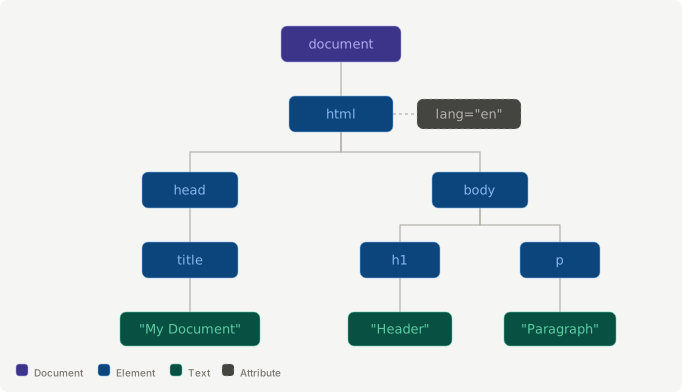
Because the document is represented as a tree, JavaScript can start from one node and move through parent, child, and sibling relationships.
const paragraph = document.querySelector("p");

paragraph.parentElement; // body
paragraph.previousElementSibling; // h1
paragraph.textContent = "Updated paragraph";
DOM manipulation is essentially reading from and writing to this tree through standardized APIs.
How The DOM Is Created
The browser gets to a usable DOM through roughly these steps:
- The client sends a request to the server
When a user enters a URL or clicks a link, the browser resolves the destination if needed and sends an HTTP request to the target server.
- The server returns HTML
The server responds with the corresponding HTML document. At this point, the HTML is still just text data.
- The browser parses the HTML
The browser reads the HTML from top to bottom. The parser identifies tokens such as start tags, end tags, and text. If it finds references to external resources such as CSS, JavaScript, or images, the browser may send additional requests in parallel.
- The browser engine builds the DOM tree
Based on the parsed tokens, the browser engine creates nodes and connects them into a tree. When the DOM tree has been built, the DOMContentLoaded event fires. At that point, JavaScript can access the document structure.
DOMContentLoaded means the DOM has been constructed. It does not mean every external resource, such as images or stylesheets, has finished loading. For the full page load, browsers use the load event.
Summary
The DOM is the common interface that turns HTML and XML into an object structure programs can work with.
HTML arrives from the server as text, but the browser parses it into a node tree rooted at document. JavaScript can then access that tree to find elements, change content, and add or remove nodes.
In short, the DOM is the bridge between static HTML documents and dynamic web applications.
References
- https://dom.spec.whatwg.org/
- https://developer.mozilla.org/en-US/docs/Web/API/Document_Object_Model
- https://www.w3.org/TR/DOM-Level-3-Core/core.html
- https://www.freecodecamp.org/news/what-is-the-dom-explained-in-plain-english/
- https://www.w3schools.com/js/js_HTMLdom.asp
- https://brendaneich.com/tag/history/
- https://youtu.be/krB0enBeSiE
- https://youtu.be/J-02VNxE7lE