In-Memory RAG Architecture
Introduction
Strictly speaking, "In-Context RAG" might be a more accurate name for this architecture. When most people hear RAG (Retrieval-Augmented Generation), they picture a pipeline that vectorizes documents with an embedding model, retrieves relevant chunks from a Vector Database, and feeds them into an LLM.
But not every product needs that level of infrastructure. At the MVP or PoC stage especially, shipping speed and low operational cost often take priority.
The approach I adopted keeps the entire document in memory and passes it directly into the LLM's context window for knowledge augmentation. This post walks through the thinking behind "In-Memory RAG Architecture" and how to implement it.
Why In-Memory RAG?
This architecture works well when you need to ship an MVP quickly or want to minimize infrastructure costs.
A standard RAG pipeline requires embedding generation, chunking, index creation, Vector DB management, and ongoing retrieval quality tuning, each step adding implementation and operational overhead. For small documents, simply passing the full text to the LLM is often simpler and more accurate.
How It Differs from Standard RAG
A typical RAG pipeline looks like this:
Document
 ↓
Chunking
 ↓
Embedding
 ↓
Vector DB
 ↓
Retrieve Top-K
 ↓
LLM
In-Memory RAG reduces this to:
Document
 ↓
OCR / Document Parsing
 ↓
In-Memory Storage
 ↓
LLM Context
No embeddings. No Vector Database. The one requirement is that the entire document fits within the context window.
Design
The target document size is up to several dozen pages: technical specs, design docs, and similar materials. If the full document fits in the LLM's context, the retrieval phase can be skipped entirely.
This approach avoids retrieval failures, chunk boundary issues, and embedding quality problems. The trade-off is higher token consumption and a hard dependency on context window size.
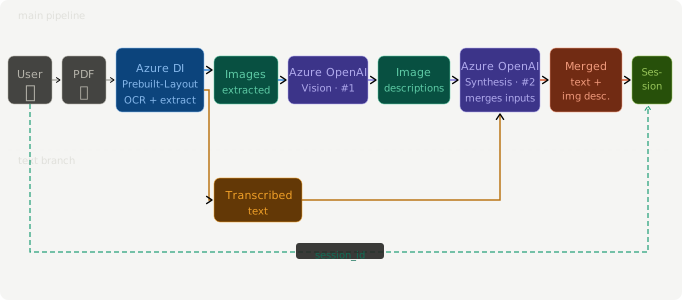
1. Document Parsing
First, extract text from the document. Good options include Azure Document Intelligence, Mistral OCR, and Google Document AI.
VLMs can also transcribe documents, but on long documents they tend to summarize or omit content. An OCR-first approach is generally more reliable. At this stage you have text only; the semantic content embedded in diagrams and figures is not yet captured.
2. Figure Caption Generation
Real-world business documents rely heavily on diagrams, flowcharts, and architecture drawings that OCR cannot interpret. For each figure, a VLM generates a natural-language description (caption).
A generated caption might look like this:
Figure-12:
System architecture diagram.
An authentication service, order management service,
and inventory service sit behind an API Gateway.
3. Embedding Captions into the Text
Insert each generated caption directly into the document body. This lets the LLM understand figure content as plain text. Each figure is assigned a unique ID and tracked in memory.
Body text

[Figure-12]

System architecture diagram.
An authentication service, order management service,
and inventory service sit behind an API Gateway.

Body text
4. Figure ID Management
To display figures alongside answers, instruct the LLM in the system prompt to return the IDs of any figures it references. Match the returned IDs against the in-memory store to surface the actual images.
{
  "answer": "...",
  "related_figures": ["FIG_001", "FIG_004"]
}
Architecture
Pros
Dropping the Vector DB eliminates the cost of building, operating, and tuning that infrastructure. Retrieval quality problems (sensitivity to chunk size, chunk overlap, embedding model, and top-K) disappear entirely, since the full document is passed directly and there are no retrieval failures to worry about. With just OCR and an LLM, the implementation stays simple enough to ship an MVP quickly.
Cons
Sending the full document on every request drives up token costs, and documents beyond a certain size simply won't fit in the context window; hundreds of pages is not realistic. The LLM also receives content unrelated to the query, which increases inference cost and latency. As the document count grows, traditional RAG becomes the more practical choice.
Conclusion
In-Memory RAG Architecture is not a replacement for full RAG. It is, however, a genuinely practical option for MVPs, PoCs, and small-scale document search. Start with this simple in-memory approach to validate value quickly, then migrate to a full RAG pipeline once document volume or user load demands it. As one stage in a phased architecture strategy, it holds up well.